

February 2026
Today I want to discuss a phenomenon called AI Nodes. I'll explain what it is and compare it with Adobe Firefly's 'Boards'. That way, you can decide what truly works for you.
And at the end of this article I'll make a claim of my own :-) — one that people who know me can already predict.
Think of AI nodes as instruction Lego bricks (a flowchart) that you link together to achieve a result. Let's take a look at what a workflow for a fashion designer looks like in a node system (such as ComfyUI or Krea.ai):
The idea is that you build a chain. Adjust a node at the start? Then you 'run' the entire chain again and see the result reflected in the drawing and further on in the studio photo.
This way of working sounds like a stroke of genius, but it's not without its pitfalls. What the presentations of such systems don't show is that AI 'hallucinates'. That's simply what AI is: one big hallucination. And the challenge is to steer that hallucination as well as possible. But in the workflow presentations, they always assume that every generation within that workflow immediately turns out as desired. In practice, that is often not the case.
While this way of working is technically impressive, when testing working with nodes I find that I get stuck almost immediately:
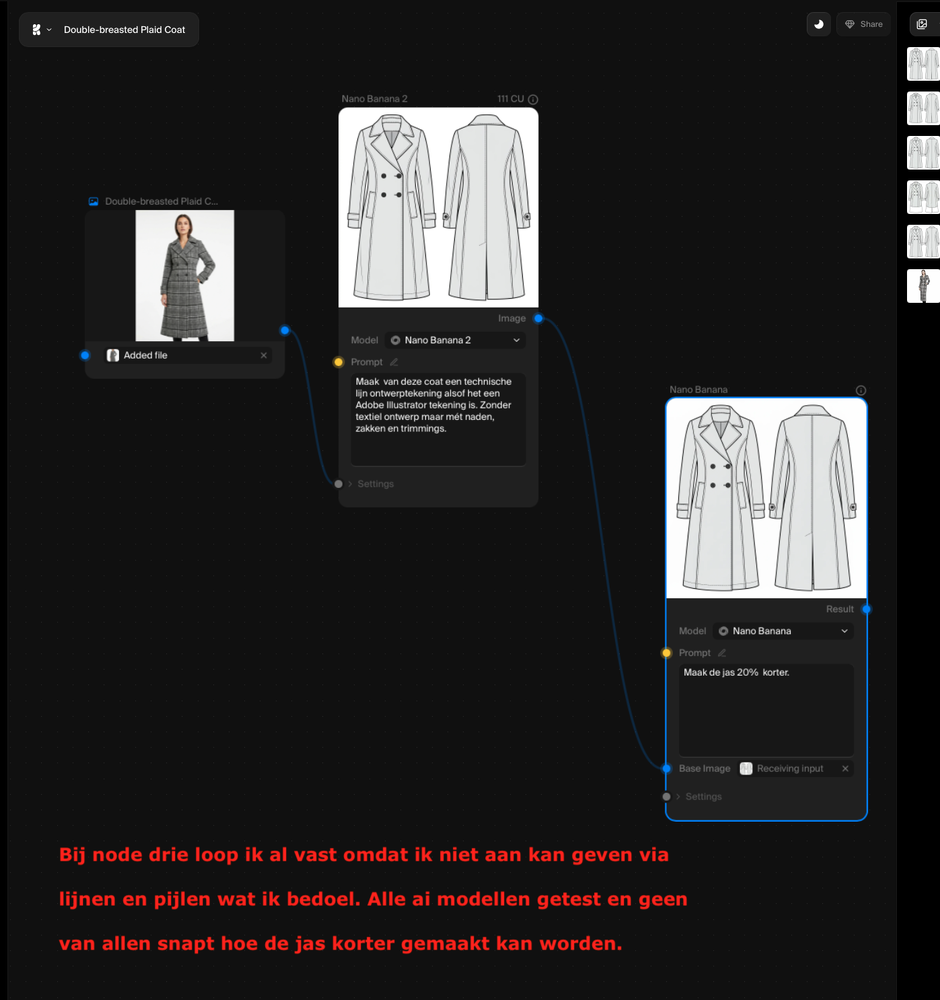
Limitations when using nodes
In contrast, there's a method I'm far more enthusiastic about for creatives: Firefly Boards. This is a large digital workspace (canvas) where you can work in complete freedom.
What many designers and companies still don't know is that your Adobe Creative Cloud Pro subscription already includes 4,000 AI credits as standard. Along with the Adobe Firefly workspace. And it just so happens to be extremely usable. So why not at least start with that.
The real power lies in the Artboard functionality of Firefly boards (drawing areas). You draw an area on your board and slide onto it everything the AI needs to know: a base sketch, photos of fabrics and — very importantly — you can draw lines, shapes and arrows on it yourself and add text instructions. Exactly the way you would explain a design to a manufacturer. That's not possible with nodes and is an immediate major handicap.
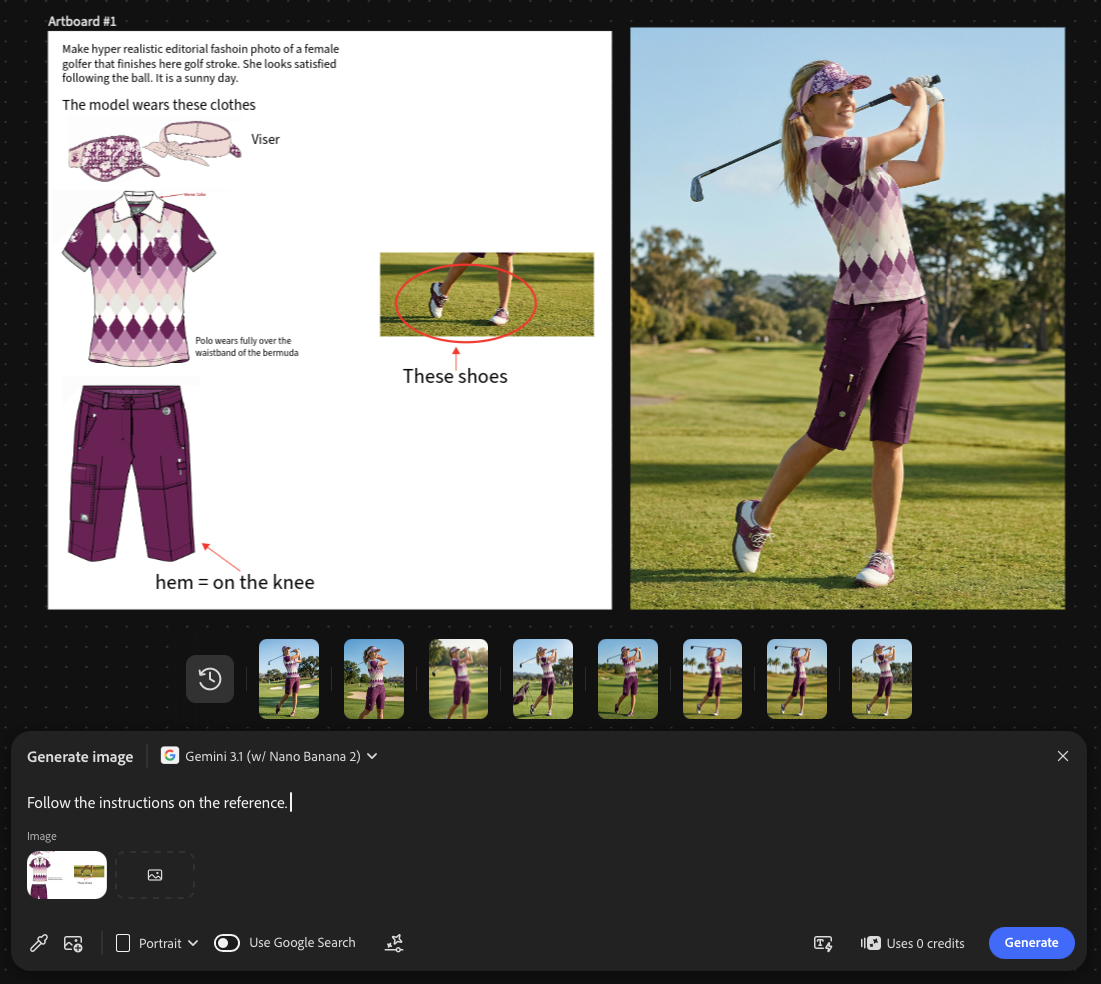
Left: the instructions on a drawing area to steer the hallucination in the right direction as much as possible. Right: the result.
You use these 'instruction collages' as a whole for your prompt. For a single generation, you can deploy multiple instruction collages at once. For example, a collage with multiple photos of your photo model for a consistent look, or exact instructions on how the check pattern of a fabric should be placed on a jacket.
Are AI Nodes a stroke of genius? In flashy demo videos, yes. But if you test them yourself for fashion or product design, you'll notice that the technical structure often gets in the way of your creativity.
Still, nodes can definitely be useful, especially for marketing purposes. Once a design is final, nodes let you generate multiple variations at lightning speed in different settings or on different models for promotional use. However, you can also manage perfectly well with Firefly boards here.
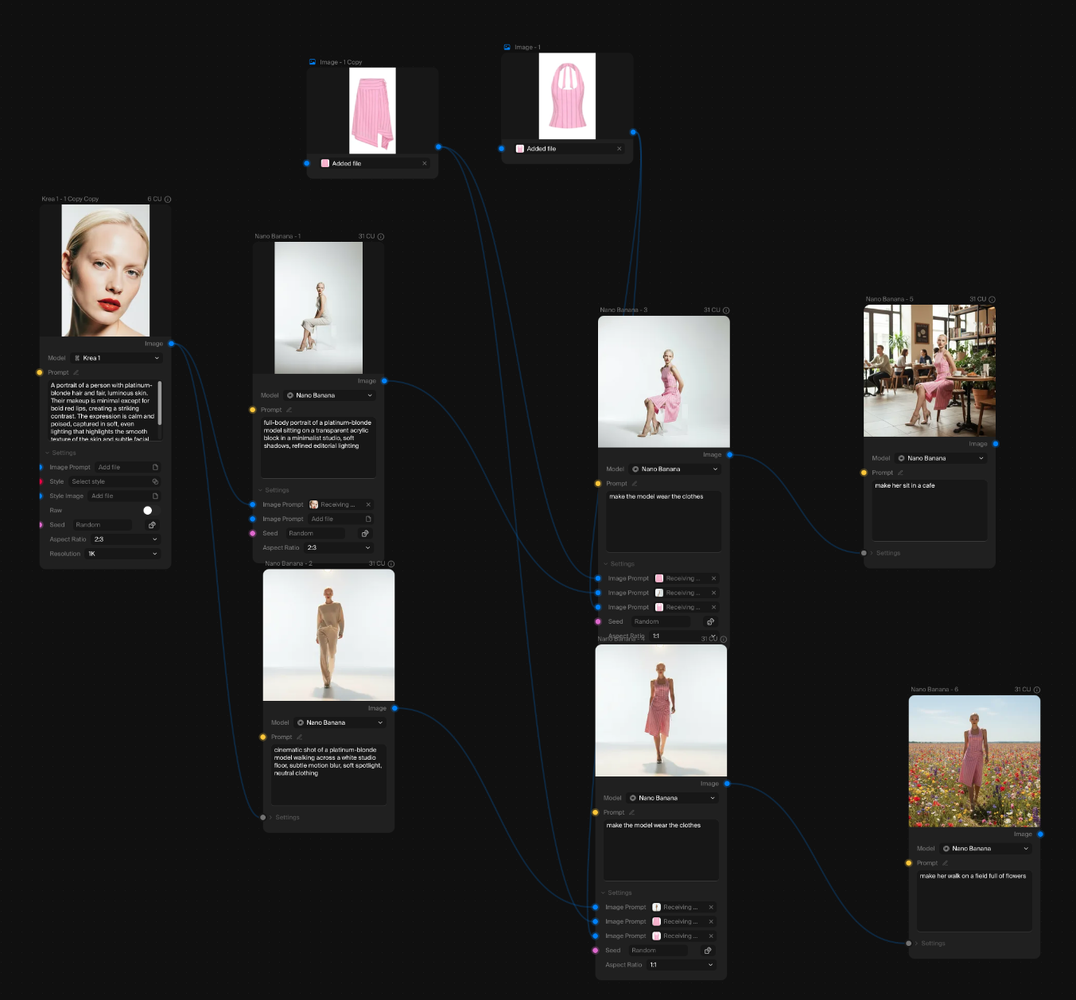
A Krea Nodes workflow to create multiple editorial photos at once from a model headshot and two clothing product photos.
For designers and stylists, I predict that Firefly Boards will become the AI standard for the creative process. It works the way we think: visual, flexible, and image-focused.
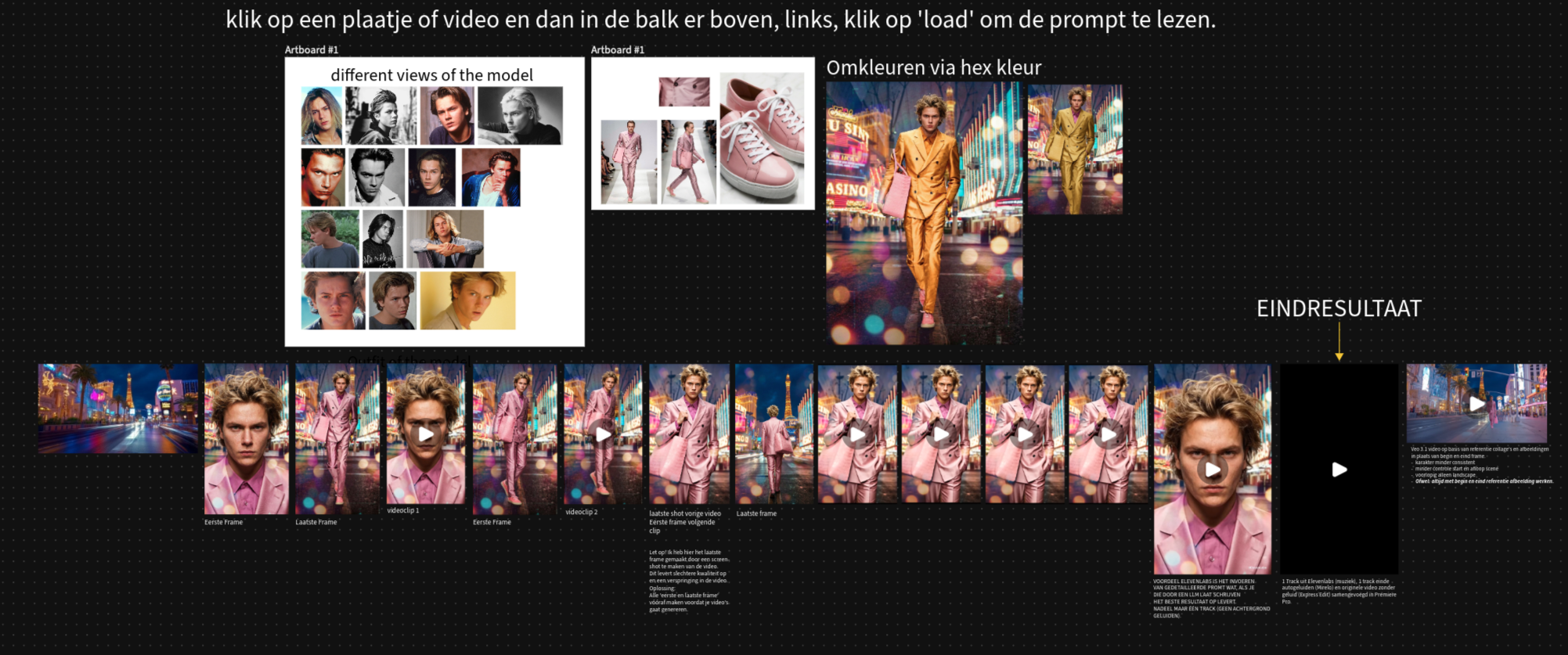
A Firefly collage defines the model, the clothing, and the environment. The images serve as the basis for video clips merged in Adobe Express, with the soundtrack generated by Firefly.
Still keen to work with nodes? I would advise you to first make sure you master the Firefly boards. And if you have a little more patience, Adobe will soon launch its own node tool called 'Project Graph'. Adobe's approach is fundamentally different from that of Krea or ComfyUI: you can link your Adobe documents directly and have operations from all the familiar Adobe applications executed directly in your node workflow. This makes the workflow more powerful and more organized for professionals who already work within the Adobe ecosystem.
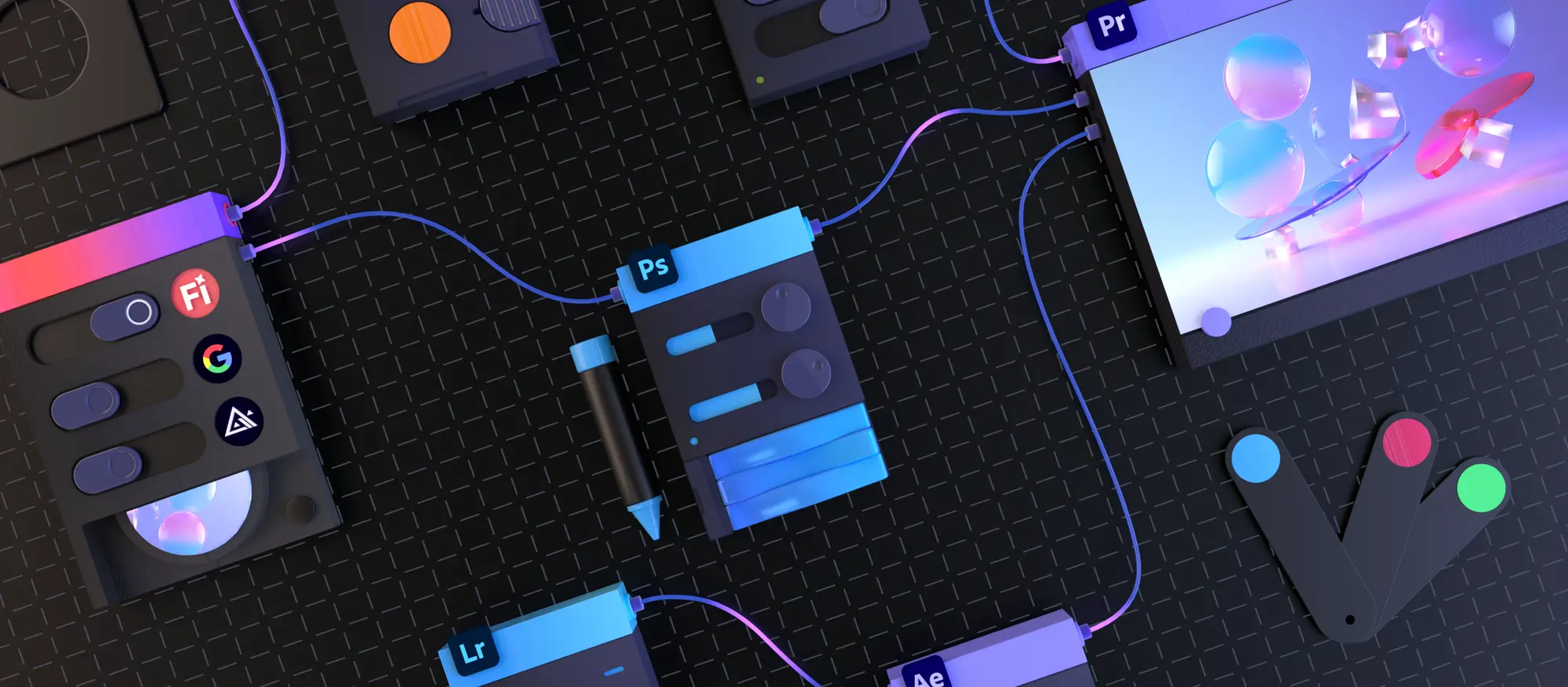
Work in Project Graph with your original Adobe documents and the features from your Adobe software programs in a node-based environment.
Want to learn how to use Adobe Firefly and other AI tools effectively in your workflow, without drowning in the tech? In our courses on Artificial Intelligence, we look beyond the hype and focus on what truly works for you as a professional.
___________________________________
February 2026
Vandaag wil ik een fenomeen bespreken genaamd AI Nodes. Ik leg uit wat het is en vergelijk het met de 'Boards' van Adobe Firefly. Zo kun jij bepalen wat voor jou écht werkt.
En aan het eind van dit artikel kom ik zélf met een claim :-) die voor de mensen die mij kennen al kunnen voorspellen welke dat zal zijn.
Stel je AI-nodes voor als instructie legoblokken (een flowchart) die je aan elkaar koppelt om een resultaat te bereiken. Laten we eens kijken hoe een workflow voor een kledingontwerper eruitziet in een node-systeem (zoals ComfyUI of Krea.ai):
Het idee is dat je een keten bouwt. Pas je aan het begin de node aan? Dan 'run' je de hele keten opnieuw en zie je het resultaat terug in de tekening en verder op in de studiofoto.
Deze werkwijze klinkt als het ei van Columbus, maar er zitten haken en ogen aan. Wat de presentaties van dergelijke systemen namelijk niet laten zien is dat ai 'hallucineert'. Dat is nou eenmaal wat ai is, één grote hallucinatie. En de uitdaging is om die hallucinatie zo goed mogelijk te sturen. Maar in de workflow presentaties gaan ze er altijd van uit dat alle generaties binnen die workflow gelijk naar wens zijn. Dat is in de praktijk vaak niet het geval.
Hoewel deze manier van werken technisch indrukwekkend is, ontdek ik bij het testen van het werken met nodes dat ik vrijwel meteen vastloop:
Beperkingen bij het gebruik van nodes
Daartegenover staat een methode waar ik veel enthousiaster over ben voor creatieven: Firefly Boards. Dit is een groot, digitaal werkblad (canvas) waar je volledig vrij kunt werken.
Wat veel designers en bedrijven nog steeds niet weten is dat je bij je Adobe Creative Cloud Pro abonnement standaard al 4000 ai tegoeden ontvangt. Mét daarbij de Adobe Firefly werkomgeving. En laat die nou toevallig uiterst bruikbaar zijn. Waarom zou je daar dan in elk geval niet mee starten.
De echte kracht zit in de Artboard functionaliteit van Firelfy borden (tekengebieden). Je tekent een vlak op je board en schuift daar alles op wat de AI moet weten: een basisschets, foto's van stoffen en — heel belangrijk — je kunt er zelf lijnen, vormen en pijlen op tekenen en tekstinstructies bij zetten. Precies zoals je een ontwerp aan een fabrikant zou uitleggen. Dat is met nodes niet mogelijk en direct een grote handicap.
Links: de instructies op een tekengebied om de hallucinatie zo veel mogelijk de goed kant op te sturen. Rechts: Het resultaat.
Je gebruikt deze 'instructiecollages' als geheel voor je prompt. Je kunt voor één generatie meerdere instructiecollages tegelijk inzetten. Bijvoorbeeld een collage met meerdere foto’s van je fotomodel voor een consistent uiterlijk, of exacte instructies over hoe de ruit van een stof geplaatst moet zijn in een jas.
Zijn AI Nodes het ei van Columbus? In flitsende demo-video's wel. Maar ga je het zelf testen voor mode- of productontwerp, dan merk je dat de technische structuur je creativiteit vaak in de weg staat.
Toch kunnen nodes wel degelijk nuttig zijn, vooral voor marketingdoeleinden. Wanneer een ontwerp eenmaal definitief is, kun je via nodes razendsnel meerdere variaties tegelijk genereren in verschillende settings of op verschillende modellen voor promotiegebruik. Echter, óók hier kom je met Firefly borden prima weg.
Een Krea Nodes workflow om van een model pasfoto, twee kleding productfoto's meerdere redactionele foto's ineens te maken.
Voor ontwerpers en stylisten voorspel ik dat Firefly Boards de ai standaard worden voor het creatieproces. Het werkt zoals wij denken: visueel, flexibel en gericht op het beeld.
Een Firefly-collage definieert het model, de kleding en de omgeving. De beelden dienen als basis voor videoclips die in Adobe Express zijn samengevoegd, waarbij de soundtrack met Firefly is gegenereerd.
Wil je toch graag met nodes gaan werken? Ik zou adviseren om alsnog eerst te zorgen dat je de Firefly borden goed beheerst. Als je dan nog even geduld hebt dan komt Adobe binnenkort met een eigen node-tool genaamd 'Project Graph'. De benadering van Adobe is wezenlijk anders dan die van Krea of ComfyUI: je kunt je Adobe-documenten rechtstreeks koppelen en bewerkingen uit alle bekende Adobe-applicaties direct in je node-workflow laten uitvoeren. Dit maakt de workflow voor professionals die al in het Adobe-ecosysteem werken krachtiger en overzichtelijker.
Werk in Project Graph met je originele Adobe documenten en de features uit je Adobe software programma's in een node based omgeving.
Wil je zelf leren hoe je Adobe Firefly en andere AI-tools effectief inzet in jouw workflow, zonder te verdrinken in de techniek? In onze cursussen over Kunstmatige Intelligentie kijken we verder dan de hypes en focussen we op wat voor jou als professional écht werkt.
 Klik hier voor Nederlands